Hey Everyone,
This one is a long one so I’ll pop it beneath a ‘read more’ tab.
Enjoy!
Class site for UC10154
Hey Everyone,
This one is a long one so I’ll pop it beneath a ‘read more’ tab.
Enjoy!
Hi!
I’m Jacinta and I study a bachelor of Heritage, Museums, and Conservation at the University of Canberra. My goal is to work in preventive conservation and to find fun and engaging ways to incorporate my minor in journalism into the field of heritage. Here is where I’ll be posting my reflections, thoughts, and experiences on the unit Exploring Digital Heritage!
In my spare time I enjoy second hand shopping, court reporting, 80s movies/music, hosting murder mystery parties, hiking, listening to podcasts (especially 99% Invisible and Snap Judgement!), and visiting art galleries!
See you around!
Jacinta?
Update: You can now find me on Twitter @honeychiler
Looking at the varieties of data and how they can be used to support a specific project or outcome in the Cultural Heritage field can be quite daunting, the results of any data based exercise, including data mining, rely primarily on the data being complete and verifiable by several independent sources.
I really liked the visual outcomes and flexibility of plot.ly it is a tool I will use back in the office for data visualisation (labour usage/frequency, energy consumption).
As for the data repositories, there were many I had never used, and in visiting them, it was apparent that these repositories are for specific data, managed and verified by the government agencies and organised to enable faster access for specific analysis tasks.
OMG … Search Engines have to be one of the best tools created for wasting time, since the late 90’s I have used many (Copernicus, Wolfram Alpha, MSN, Yahoo and Google…just to name a few). The one thing to keep in mind constantly is verification, in particular, the need to properly verify the sources and value of the information as presented from the search results.
Looking at the tools presented in this lecture, they highlight the differences in the information submitted by each of the search engines. This week, for example, through comparison of MSN & Google (including Google Scholar) and Serendip-o-matic the same search criteria reveals that information as presented had noticeably different results.
It was also found that Serendip-o-matic showed results only from a limited database of mainly historical records while the MSN & Google (including Google Scholar) contained results gathered across the internet. What was found to be interesting about the results is that they can be unexpected and may lead to (sway) an alternative perception of the subject matter and subject you were researching.
Through the knowledge of different ways to use search engines and data networks and the right tools to use, research times can be reduced and the outcomes for finding verifiable information achieved.
Having finally put pen to paper (don’t judge me I’m an Analogue Kid in a Digital World) to flesh out details for my project, thoughts wander to how much of this course I’ll be able to use. So far everything I’ve read, links followed and applications accessed has opened my eyes to the possibilities of presenting something truly “digital”.
So far everything I’ve read, links followed and applications accessed has opened my eyes to the possibilities of presenting something truly “digital”.
Working through the content for this week I found Zooniverse and the concept of crowdsourcing quite fascinating and a great research tool for future heritage and building conservation projects. Twitter is a tool I normally only use for receiving tweets relating to news that affects the building I work in, using a
Twitter is a tool I normally only use for receiving tweets relating to news that affects the building I work in, using a bot to now do the hard work has now meant that the results are more relevant.Looking at Trove Traces, another one of those great tools developed by our lecturer, I used it in my initial search for articles that may be relevant for my project.
Yes, my project finally has a plan…
Hi, my name is Rob, a part-time student studying Heritage, Museums and Conservation for the purpose of furthering my understanding of Heritage buildings, the stories they tell and the flexibility they have for future use in our modern society.
When I’m not studying my day job is the operational management of a large Heritage listed commercial property, occupied by a Commonwealth agency and in use 24/7 and yes, it keeps me very busy.
This Unit is one of my compulsory subjects, so I’m excited to learn how we have moved from the analogue age and how we can use modern digital technology to document and preserve the tangible and intangible for future generations.
I noted in reflections for week one, my digital footprint which even after the first lesson increased noticeably, never up until commencing this course have I had to develop so many usernames and passwords…and yes I’m keeping a list.
I’ve just finished the week 2 readings and activities and the one thing that stood out to me the most was the guy who created 200 Trove lists about lawnmowers. My first thought was “that’s super random, who needs that?” but then I thought that it actually is really cool that there are ways for people to collect things that are really specific to them. I got lost on Trove looking for things that I’m interested in and seeing how many specific collections cater to my interests. When I was younger I collected magazine and newspaper clip outs of my favourite model, Lily Cole (no longer a model, but she continues to inspire me with what she does), so I just cant wrap my head around the fact that all of these magazine clippings of her are now on an online database.
I remember learning about Trove and hearing similar things in a previous class of yours Tim, Anthropology of Collections I think? but I will have to admit that I didn’t appreciate Trove for what it is at the time, but now after doing this unit I just think it is so great.
The Tiny Gallery is my new favourite thing, it reminds me of an online dolls house. Zooniverse.org is really cool, I can see how something like this would be so useful in the cultural heritage/ conservation sector.
I actually feel like it was easier to go back and read through the week two activities and readings now (at the end of the semester) than it was earlier on in the semester. Coming into this unit I found it hard to understand everything because of how different this unit is to everything else I’ve studied, but now I’m finding it easier to understand things I previously couldn’t wrap my head around.
Thanks,
Nour 🙂
Redaction Art – I really want to know if the requirement to redact certain information created these blobs or if the emergence of a creature or object shaped the redaction (a chicken or egg question!). These images reminded me of the Rorschach test used by psychologists. I got side tracked trying to find out what inkblot tests are called and found this weird online inkblot test. http://theinkblot.com/ (do not be tempted. Once you start, you will have to finish! )
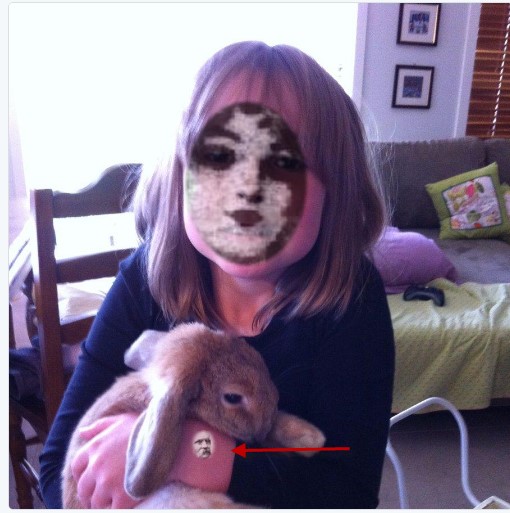
It was entertaining playing around with the Vintage Face Depot. I posted the following picture of my daughter. The face applied looks like an antique mask but check out the spooky little face on her arm.
It appears that Facebook, Google, IBM and probably many other companies are moving forward the development of facial recognition software at an alarming rate. It will not be long until concepts explored in the television series “Person of Interest” https://en.wikipedia.org/wiki/Person_of_Interest_(TV_series), are a reality. In this show, people are tracked using facial recognition via street surveillance cameras. This is a rather scary prospect, following the ideas presented in this show using cameras in public places and no doubt images included in social media our movements could be tracked most of the time. It is interesting to consider that France has just banned facial coverings https://en.wikipedia.org/wiki/French_ban_on_face_covering . This article talks about how as a society we rely on facial recognition to identify people. You have to wonder if some governments are already using computer facial recognition to stalk us.
As facial recognition software improves, it could be used to identify new imagery of historic people. For institutions with limited funding, it could be applied to previously undescribed images. However in historical terms there might be limited application, given that photography has a been widely available for only about the last 130 years. Perhaps, in time it will be possible to identify people in creative works.
As discussed in class, when the National Gallery of Australia was looking for a Digital Asset Management System (DAMS) to manage their images and other media assets, the tender documents describing requirements included facial recognition. As I understand it, they hoped that their DAMS would be able to automatically catalogue images of people via facial recognition, thereby reducing data entry. They have since implemented a system known as Diva (this might be an Oracle product). I am not sure if their notion of facial recognition has been successfully implemented.
See you later,
Lisa.
I am probably the most incapable map-reader in the whole world (incorporating a Tom-Tom into the family probably saved my marriage!), so I was surprised by how much I enjoyed playing with maps this week.
Beginning with Google My Maps, I wanted to mark all kinds of spots. I can see how you could tell stories through plotting. It would be fun to mark-up family holidays and all kinds of stuff! Correcting the mistakes in the Australian National Heritage List so they would plot correctly became a bit of a google quest. I was able to map almost everything in the end by either replacing the ext with another detail or by removing some detail.
For example;
• Coranderrk – Change La to lane
• Koonlda Cave – Remove Cook
• Kingston and Arthurs Vale historic area – change ext to TAS
Moving on, I really like the way the Orbis map illustrates a story. It is a bit like a choose your own adventure book from the 80’s. Yes, I know many of you would be too young to remember those…
Many of the maps included in the Carto Gallery were very cool. My favourite was http://mortuarymapping.matrix.msu.edu/index.html. This site records the excavation of The Santa Clara Valley Medical Center (SCVMC) Historic Cemetery, providing a number of different filters. It includes what they have called a button map, which indicates people who were buried in hospital gowns. Burials took place in this cemetery in the early 20th century those buried in gowns were identified according to button patterns as the glass buttons survived. Very cool!
I also really enjoyed playing around with the Carto map populated with cycling accidents (not a very happy subject). Placing this data on the map really helps to make sense of information and makes it much more compelling than just looking at it in a black and white table. Using the variety of filters transformed the data in a different way
I am interested in trying to incorporate carto into the “Connections” web site that I am building. The limitation of 100 points per month could cause issues, but it is very useable. The other thing that I liked about the SCVMC Historic Cemetery site is the hand drawn burial map. Originally, I had thought that I might geolocate each burial, but it might be cleaner and more accurate just to geolocate the cemetery itself then provide a plan or map of the cemetery.
That’s all from me this session…
This week was very helpful!, now I know something I have not thought about it before.
Archiving, not only collections, but different sorts of information though an application is just great!
I believe this week’s information and websites will help me develop my Idea for my final report easier! specially DIY webarchiving, is just what I needed to search trough different sources of information and collections.
the fact that it is so specific gives you a great starting point for searching. the information is clear and in different formats. an example would be Film Noir: https://archive.org/details/Film_Noir
