Week 6

Sinuously! How many types of graphs can there be?

I consider that is good to get to know about different types or ways to make graphs to adapt to the different ways of showing information. visualizing something helps to understand things better! The colours that distinguish the different elements, time periods, etc. All settle into one graphic. It’s amazing how easy it makes you acknowledge a huge amount of information just in one visual.

But, although is good to have different types of graphics that adapt to the type of information you have or to the way one wants to display things, It could be tricky for does that do not have much experience with technology.

One has to be careful, depending on the graphs you use there are many things that can be misunderstood by other viewers.

In addition, the technology advance and new graphs come into play constantly, what will create lots of confusion if you are no up to date.

in conclusion every graphic should be enplane briefly for the viewer to understand it.

week 4

Well, this class was a bit confusing for me.  It is true that data is easier to read through graphs and other type of representation, than that would have been, for me, before knowing about this tools. Yet, I wasn’t able to understand properly how to do it and how it works. Being honest, I was completely lost for the whole class and it was hard for me to assimilate all the content and the different tools.

I was really confuse about the type of files use in each. although some of the tools like Plot.ly are easy to use and you only have to cut and paste, for me it was a nightmare.  I couldn’t get it at all, despite the fact of going home and reading everything twice.

week 3

For this class, we look upon different search tools.

I didn’t know how many ways to search though things where out there. The coolest thing is, that depending on the tool you use you get back a different result. For example:

Serendip-o-matic gives you the results just from a search within the collections, while Google gives you the results from the whole Internet. You can see the ‘past’ in Serendip-o-matic, and see the ‘now’ through Google.

What I found interesting about this class is that, you can even get results that you were not expecting to get or that you would have never imagine as options, but they are relevant to your search.

In my opinion, Knowing about different ways to search though networks is essential, not only for collections but for the increase of knowledge in general. And knowing which tool to use, will also save you time on the search for something, due that it narrows down your field of work (according to the tool you use).

Reflection – Week 9

In todays class I learnt how to zip up a file on a mac. So unlike PC’s, mac automatically unzip your files. Which doesn’t help when trying to carry out tutorial tasks. It’s not hard but whenever I hit roadblocks and things don’t work perfectly as detailed in the steps I stop, instead of pushing through to find the answer straight away. Anyway I found the answer in record Amanda time today and can now move on with the rest of the task. So I tried the Reduction task with interesting results. After uploading the zipped files and waiting well over the suggested 3-4 minutes training time, I was able to see how the recognition program works.


Every week we are shown something new that I would love to implement on some kind of cultural heritage endeavour. If seems fairly simple using the visual recognition program and I wonder if it could be used to identify family heirlooms or museum acquisitions. You know how people take their treasured possessions to some expert on ‘Antique Road Show’ or a local expert. What about a program that people could use to identify their object at home. I guess the database would need to include millions of images and information collaborated by many experts. But it could be possible. This type of program would be particularly useful for classifying museum acquisitions especially in smaller museums where an expert may not be present. Once the object has been identified it could be presented with a list of history, display, and care instructions. 3D imaging would also help the accuracy of the recognition program.


As for recognition use in the future with all its dangers and issues, humans have always recorded the past. And like the use of redactions, decided for whatever reason to include or not include parts of those details in their retelling of their version of the past. We, as a human race have managed to mold our past as accurately as our memories and personal requests have desired. So, yes using technologies might also skew the history records, but that really is no different to what has previously been happening. So I think the danger here is not so much in the false positives a machine gives but the power we are giving to machines in writing our past.


This isn’t all doom and gloom though whatever the out come the human race will still move forward and deal with whatever catastrophe we create by our own doing and it will be just another story for the history book. If technology is going to keep growing in use and advances as it has (and of course it will) then people just need to soften up to the fact that yes they may one day be labelled a gorilla like Google’s photo app mishap, or Asian when frowning (as in one of Tim’s facial recognition examples) or any other number of titles. Besides I don’t think the new fashion styles for avoiding facial recognition are that bad. They are very futuristic and the future is where we are all heading.

Week 11

Ok this is unfair, I’m trying to get these responses done quickly, but then there iss a link to classic arcade games, and solitaire?! I’m not getting that hour back.

Jokes aside, functional archiving of digital material is fantastic, it really leans into the idea that heritage is best when holistic experiences are preserved, not just the evidence of them. For tangible heritage its a lot harder, keeping functional items functional, and able to be used by anyone, is often difficult or impossible. For example, keeping a 100 year old motorbike working, and letting anyone who asked a ride of that bike would not only be dangerous, but probably damage the bike itself. But anyone can play Sega’s Hang On.

Again, saving old websites, and UI’s and games, seems closely linked to ideas of intangible heritage. I mean, they’re pretty much intangible anyway being digital, but being able to preserve the experience of using Windows 3.1 is amazing, particularly when we live in a world of constant updates to software.

Week 10 Reflection

Hi all,

First off, who wants some honey? Making a 3D object with just your phone is great! Last week some items at work were being 3D scanned with a device and custom software costing a small fortune! Albeit, their model is significantly higher quality.

I’d like to talk about what happened at work with the 3D scanning for just a bit. The in house Multimedia team scanned an item for display, to then 3D print a custom mount. Pretty cool stuff I thought. I’ve also been a part of a conservation project, where we needed a 1:1 replica made of a small model of a first world war soldier, so we got one 3D scanned and printed. The newly printed 15cm tall model is on top of a Diorama in the First World War Gallery at the Australian War Memorial, in amongst models that were made 20 years ago, and you can’t tell the difference between them. Although, if you have a sharp eye you can see that two of the figures are holding the exact same pose. Little easter egg to look for if you’re ever wandering the gallery.

My point here, is that I’ve had multiple interactions where 3d scanning, and printing, and it has been a practical solution to common museum exhibition problems. So I don’t think 3d scanning and printing is gimmicky, although I am aware that there are solutions to those problems without the technology. Exhibition mounts and replica’s can be made without 3D scanning/printing, its just more convenient, and accurate than traditional solutions, and 3d scanning is getting cheaper (see my honey model above which I made for for free).

3D Tours on the other hand, I’m not sure I’m sold on.

I like the idea of them, creating a 1:1 digital representation of a space is pretty cool, particularly when it is somewhere very hard to get to, like somewhere far away, or impossible to get to, like somewhere that no longer exists. But what always falls short for me is viewing a 3d space, on a 2d screen, just isn’t particularly immersive or interesting. Don’t get me wrong, it’s not that I think it isn’t possible for 3D spaces to be immersive or interesting, much the opposite; I’ve spent countless hours playing video-games because of their immersion. I understand that a fictional world is probably easier to make interesting than having to be confined to copying reality, but I don’t think i’ve ever seen a virtual tour of a site or museum that has come anywhere close to making me want to just explore.

Although, if I had minecraft downloaded on this computer I’d definitely be checking out the Gallipoli map made by Auckland museum. Seem like a great project.

I’m not sure about Heritage VR just yet. Not becauce I’m particularly skeptical, I just haven’t tried it yet. I’ve tried some VR, but nothing remotely related to heritage, but I can think there are some cool projects that are possible with the technology. As far as whether or not Heritage VR is a gimmick, I’m not sure, we’ll have to see after the tech is more accessible.

Anyway thats it for me.
Cya next time.
Week 10: Virtual Realities

I love the potential for 3D imaging (and printing) and am so glad it has been discussed in this class because not only is it weirdly cool and futuristic, it has so much use in the heritage field. I actually really like th example of when a historicaly significant arch had been destroyed in Palmyra by Islamic state, 3d imaging from UNESCO was used by the Institute of Digital Archaelogy to create a 3D print of the arch using Egyptian marble and now stands in Trafalgar Square. Not only is this letting a new audience interact with something that may not have otherwise (also good like Tim suggested from educational purposes for remote towns but also good for potentially dangerous countries that have a wealth of historical objects many can’t access) it’s also saving that object as well. Touching and seeing an objects physicality is a primary component of engaging with, understanding and enjoying an objects, and gains context to its history. Recently I visited the 100 objects of the world at the National Museum, and one of the objects is the original wood cut of Durer’s Rhinoceros. Next to the originial the National Museum has a hologram of the rhinoceros and a link to a 3D printable from their website. These are there to represent the inaccuracies in the drawing (as it is considered a non-accurate drawing of a rhinoceros that was taken as fact by the British) as well as a good educational tool.

I do agree that we don’t want to get too caught up in augmented or virtual realities, as it takes away the realness of seeing objects (we’ve all seen the Mona Lisa before, but how many have really seen it is different.) However I think that in terms of accessibility it is a great digital strength, those who may not have money, physical ability, or live too far away can experience museums that they may have interest in personally or academically. In regards to specific museum’s purposes this may match many criteria of letting the public experience history and sharing that.

Here is an example of my own 3D image using 123d catch, I have a humble collection of Buddhas so here is on

Week 11: Archiving the web

This is something that really has not occured to me before but really should have. Archiving the web has so many purposes, and offers such a great insight into the technology, opinions and social practises in contemporary history. In particular WebRecorder is an interesting tool for personal curating of your own experience with the web, and takes control of both literal history and the way we engage with it. No non-digital tool could simultaneously use the technology it is trying to archive and show its capacity. Storify is an example of collecting reactions/thoughts that I think has a lot of potential. Obviously twitter already has the ‘search’ tags, which similarly does what Storify does, but Storify allows you to curate, and present it in a tangible and analytical way. I made my own on the reactions of twitter promoting the Smithsonian’s kickstarter project to help raise funds to preserve Dorothy’s ruby slippers from the Wizard of OZ:

I always think in terms of collecting and objects, what can this tell people 100 years from now and does it matter? In this time the internet would be a hugely significant thing in communicating to people from the future studying history of today of what society was like. I think capturing not only websites and their history, but it’s also a new way of capturing people’s beliefs and opinions on social media which is really cool.

Week 7 Reflection

Hey everyone, I’m catching up on some of the lessons I’ve missed over the semester (no better time to do it than when I can use the free wifi at uni!).

The topic of maps accurately depicting reality reminds me of something I read recently about American students not realising that the world map looks like this in every other country because the maps that are used in American schools look like this (Chopping Asia in half so that America can be in the middle!).

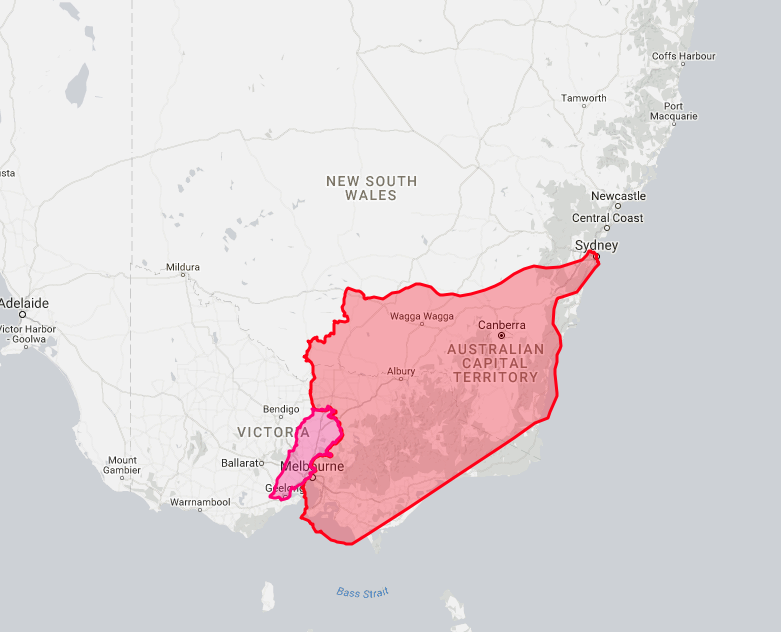
I had a bit of fun with http://thetruesize.com and used it to compare where my parents are from (Syria and Lebanon) to where they currently live (Melbourne, Australia).screen-shot-2016-10-19-at-2-42-17-pm(Syria is red and Lebanon is pink)

The True Size is a really cool programme but I wish it allowed users to map states in Australia, or islands. Specifically so I could see the size difference between Canberra and some islands that I want to visit, or live in. Whichever I can afford first.

I also created my own map in Google maps; I started off in Syria and Lebanon again and then mapped out where all my immediate family are around the world.

I thought the idea of georectifying Australian maps was intriguing but I couldn’t really get it right (despite the steps being written out for me!).

This lesson was mostly* enjoyable because it got me thinking about things I previously haven’t given much thought to, and it brought up the story of the random Kansas farm which was unusual and different. The lesson gave me a better understanding of maps, and how complex they are.

*mostly enjoyable but frustrating when I couldn’t get certain things to work for me.

Thanks,

Nour 🙂

Week 9 Reflections

Good Evening

Running late again, so here we go.

Both the redaction art, and the face finding, made me think of other ways in which clever scripts can glean information from databases. Could programs search collections to help identify items? The idea being that the image of the item is being used to supply information, rather than curatorial data or tags. I’m thinking of physical collections rather than archives, however, I doubt that would be necessary, as most items photographed for collections should have descriptive information attached prior to photography right? I wonder what collections WOULD find that useful. I guess that would make it a form of datamining, where the program is looking for images/shapes rather than text. I think it would be useful in some of the crowdsourcing projects we saw earlier in the semester on Zooniverse.

I work at the Australian War Memorial, where there is a running project to find portraits of all the first world war service personnel. I wonder if the collection has been searched with facial recognition software? Perhaps something to ask the curators tomorrow.

Also, here is my tweet for the Vintage Face Depot. Hmmmm

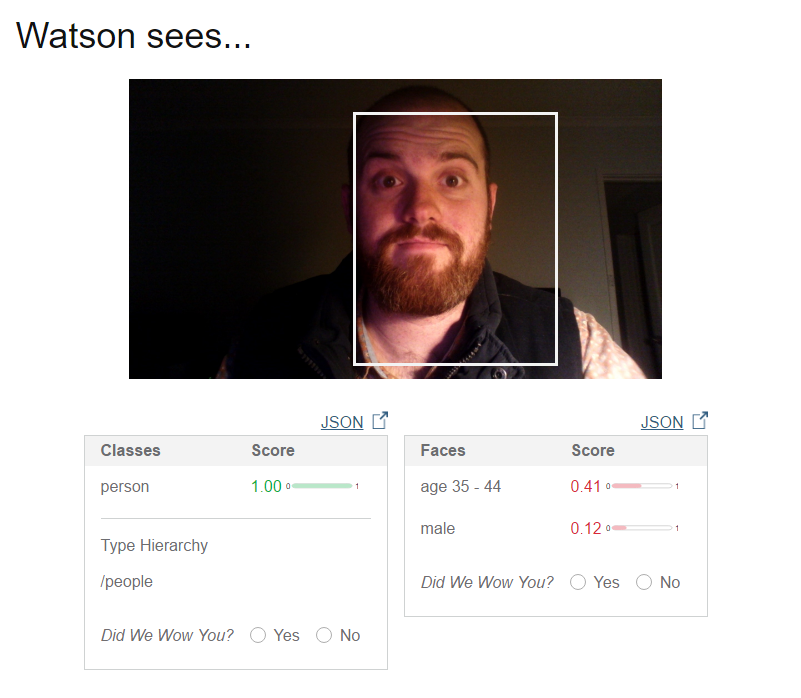
I just tried out the IBM demo system, and it’s pretty cool! Here is what it had to say about the same photo I used for Trove

watsonthinksofmePretty good, but I’m not particularly wow’d by how old Watson thinks I am.

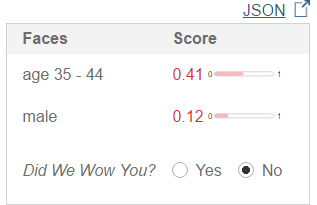
watsonthinksofmeno

What sort of half-rate super computer can be thrown off by twelve years by just a little pre-mature balding?

Anyway, I couldn’t get the demo to work on the redaction data, I’ll have to try again later.

Goodnight all!


css.php